

LEDs and matrices
LED layers
Decide what a strip or a matrix shows and when: ready-made layers for shift lights, flags and warnings, the lamps each layer covers, what it paints, when it is on and how layers stack.
A strip or a matrix shows all its layers at the same time, stacked on top of each other. Wiring the strip comes first, in LED strips; trying the layers out at your desk is in Previewing LEDs.
Add a layer
- 1Press Add layer… on the Layers tab, below the lamp map. A card is greyed out when the device has no room left for the layers or pictures it adds.
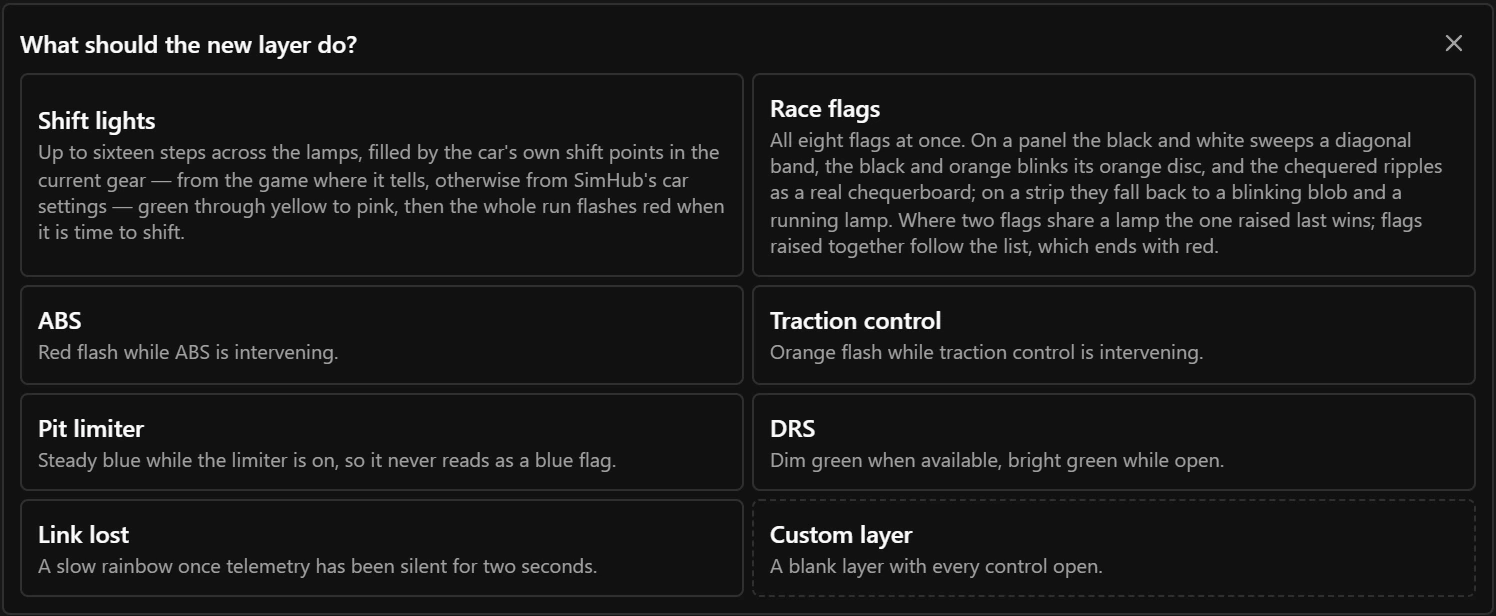
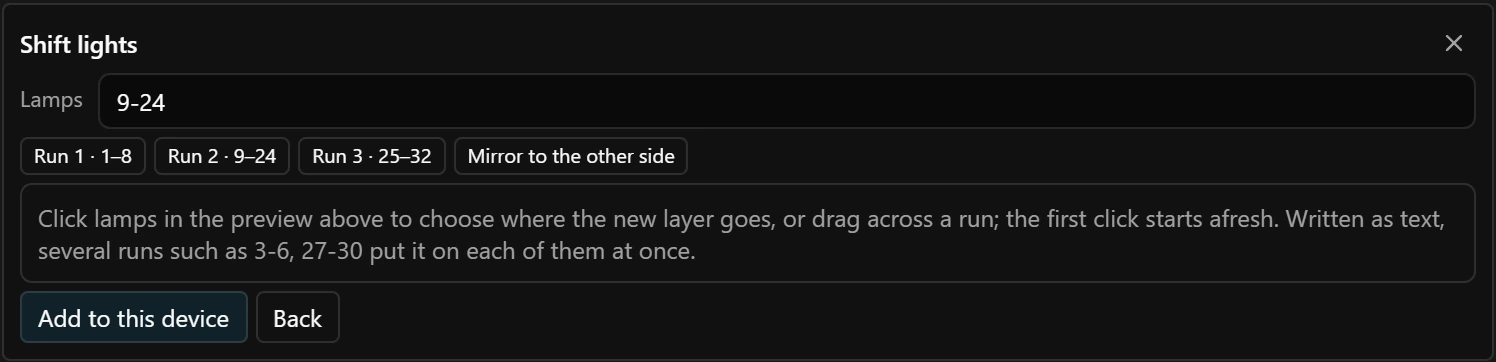
- 2Press a card. On a matrix the layer is added straight away and covers the whole panel. On a strip the picker asks where the layer goes (Choose the lamps). The first click on the map starts afresh.
| Card | What it adds |
|---|---|
| Shift lights | Two layers. Shift lights has one step per lamp, up to 16 steps, lit green through yellow to pink as the revs climb towards the shift point of the current gear. Limiter flashes the same lamps red, hiding the steps, once the shift point is reached. |
| Race flags | Eight layers, one per flag. Green is steady and stays 2 seconds after the flag is gone; white, blue, yellow and red blink. On a strip the black-and-white flag blinks as a white blob, the black-and-orange flag as an orange one, and the chequered flag is a running lamp. On a matrix these three draw a sweeping band, an orange disc and a rippling chequerboard, and add those pictures to the Pictures tab. |
| Gear | Matrix only: The gear. |
| Pit limiter | Steady blue, so that it never looks like a blue flag. |
| Link lost | A slow rainbow once no telemetry, the live game data, has arrived for 2 seconds: after the game has closed, for example. |
The shift point is worked out for each car by the Pitrig plugin in SimHub: from the game where the game tells it, otherwise from SimHub’s car settings. When you choose several runs of lamps for a card, every run shows the whole effect at once. A card makes ordinary layers, so everything about them can be changed afterwards.
The layer list
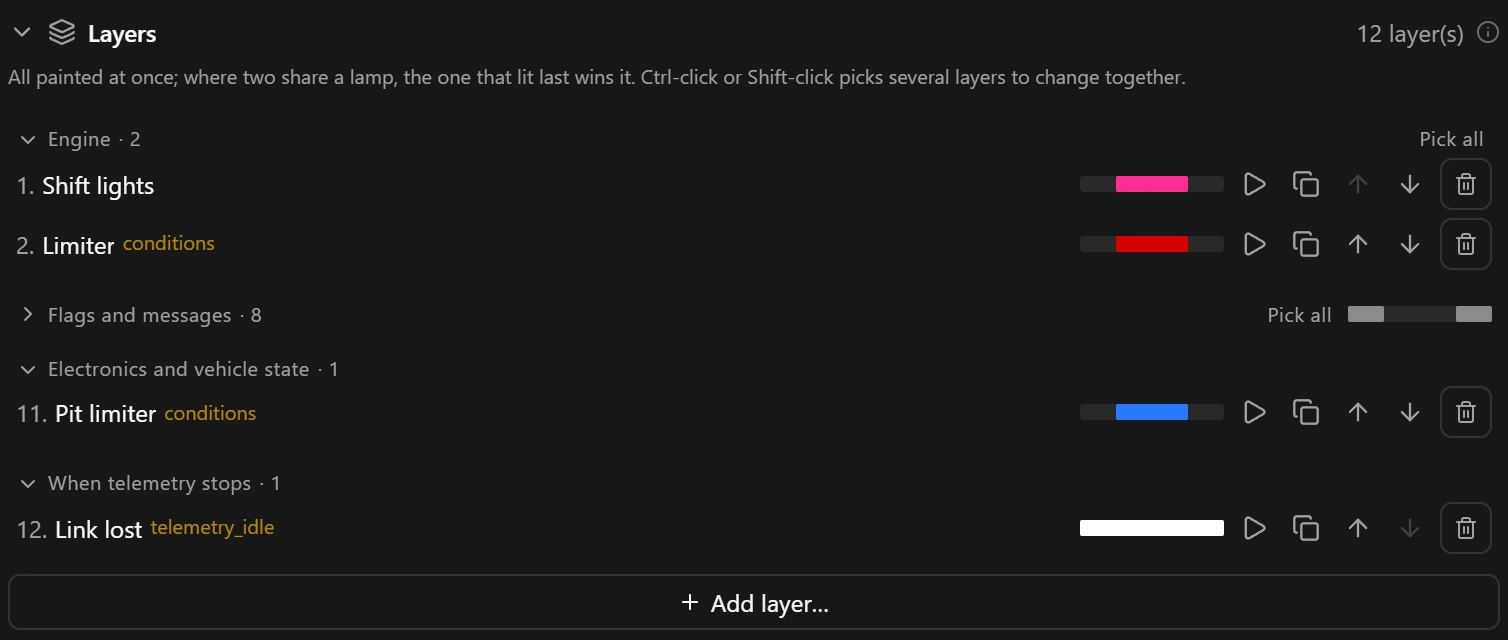
- 1Engine: layers next to each other that read the same kind of value share a heading.
- 2Play: plays the layer on its own in the preview, see Previewing LEDs.
- 3Bin: removes the layer at once, without asking.
- 4
conditionsbeside a name means the layer waits for a value, andtelemetry_idlethat it waits for the data to stop.
Choose the lamps
- On the map. Pick the layer in the list, then click a lamp to add it or take it away, or drag across lamps to do the same for the whole run. Alt-click (Option-click on a Mac) picks the layer on top of a lamp instead.
- In writing. Type runs in Lamps, separated by commas:
3-6, 30-27. A single number is one lamp. A run written high to low, such as30-27, runs backwards, and the order of the runs is the order a fill takes. - With the buttons under the field. Click a run’s chip to run that part the other way. Mirror to the other side adds the same lamps at the other end of the strip, running the other way: on a 16-lamp strip
1-4becomes1-4, 16-13.
Several runs
With two or more runs, Spread decides how the layer uses them. As one line lays the runs end to end, so a fill runs from the first into the next. Each part on its own paints the whole effect in every run at once, so the flags at both ends of a wheel flash together and a mirrored shift light fills from both ends towards the middle.
On a matrix a layer shows on pixels instead, chosen in its Shows on grid or by clicking the map: see LED matrices.
What a layer paints
| Paints | What it draws |
|---|---|
gradient | A fixed spread of colours along the lamps, from its Colour ramp. |
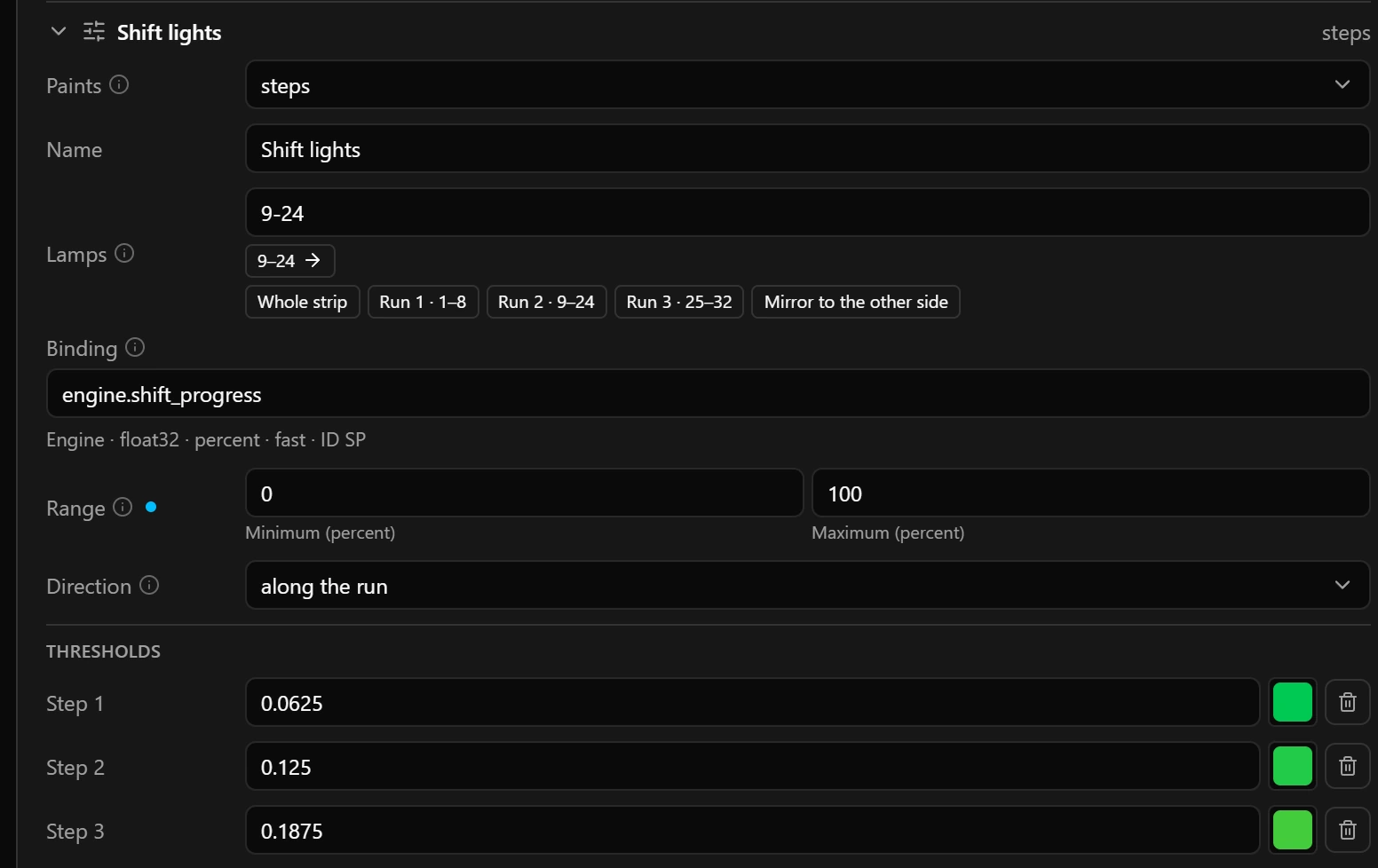
steps | Shift-light style. The lamps are shared out in order between the Thresholds, and each share lights when the value reaches its threshold. |
gauge | A fill that grows with the value: halfway through the range lights half the lamps. In one Colour, or in a Colour ramp read at the value, so the fill changes colour as it climbs. |
animation | A movement on its own clock, such as a rainbow or a running lamp: see Animations. |
sprite | A picture or an animation drawn on the Pictures tab, offered once the device has a picture. It adds Picture, Play frames with Frame holds, and Frame: see Pictures and animations. |
text | Digits, N and R in a built-in face, on a matrix only. It adds Text, Face and Scroll step: see LED matrices. |
The settings
| Field | What it does |
|---|---|
| Binding | steps and gauge need one. See Choose a field. |
| Range | A value outside it counts as the nearer end. |
| Thresholds | Each step lights at a share of the range, from 0 to 1: 0.5 is halfway. |
| Colour ramp | On a gradient a stop’s value is a place along the lamps, 0 at the first and 1 at the last; on a gauge it is a value of the binding. |
Animations
An animation layer moves by itself: try each Motion in the preview. Pass is how long one pass takes, and Span is the tail of a comet, every so many lamps of a theater, the lamps of a sparkle and the block of a bounce. All motions except rainbow paint in Colour.
When it paints
| Field | What it does |
|---|---|
| Gate | telemetry_idle: only after 2 seconds without telemetry, for a lost-link warning or an idle animation. |
| Watches | A layer watches one value, shared with its colour rules. |
| Rule 1 to Rule 4 | A comparison and a threshold, as in Rules. The layer is on while any rule holds. |
| Switch-off margin | For a number: once the layer is on, the value has to fall back this far past the threshold before the layer goes off, so revs hovering on a shift point cannot make it flicker. |
| Hold | Keeps the layer on for this long after its gate lets go, so a short event such as traction control still shows. |
| Blink | The full blink period: 500 ms is 250 ms on and 250 ms off. |
| Covers | Ticked, the layer first fills its lamps with this colour and keeps them filled while it blinks, so the layers below never show through it. Unticked, they show wherever this layer draws nothing, between flashes, between the dots of an animation and on steps not yet lit. |
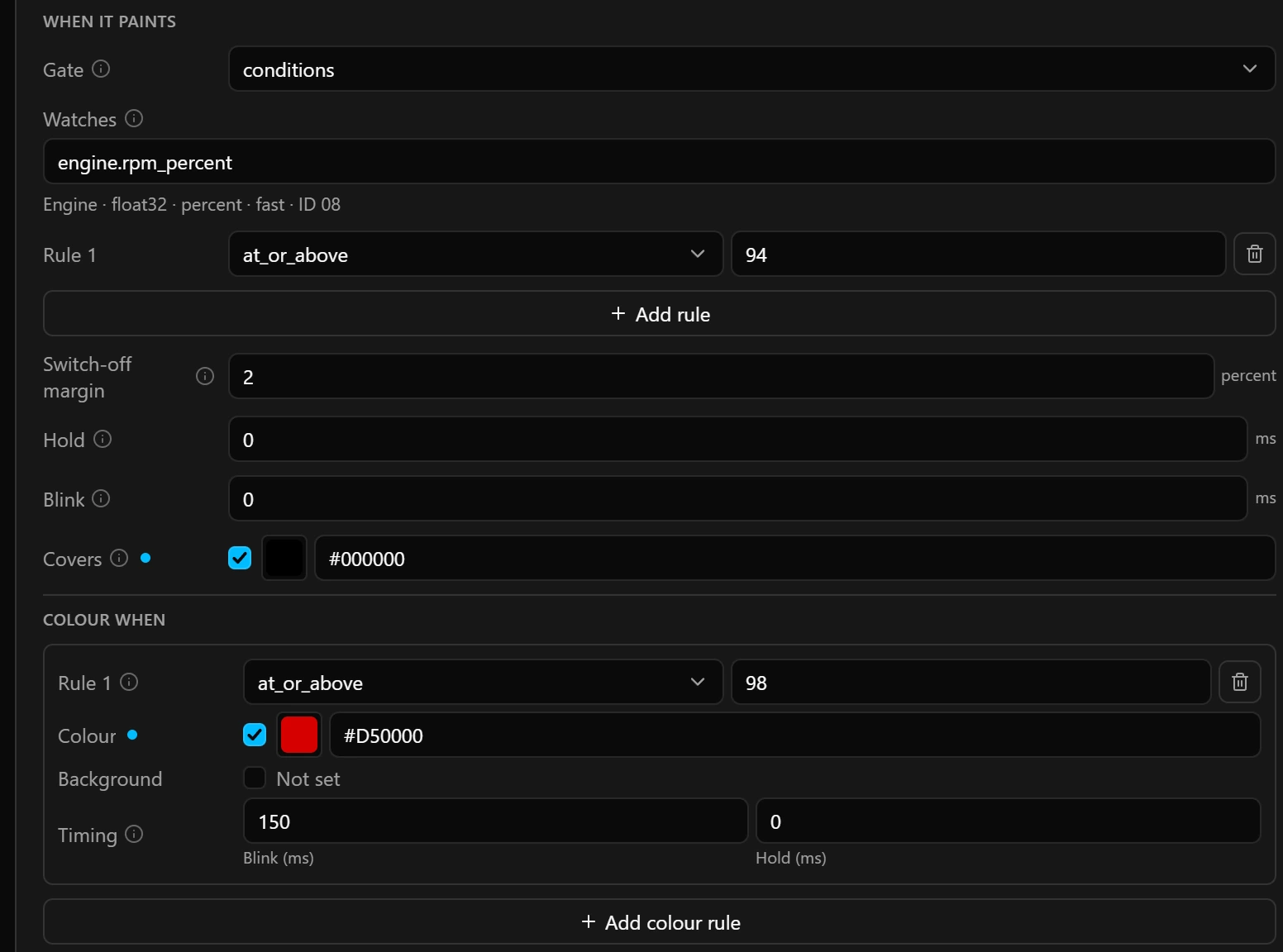
Colour when
Colour rules change how a layer looks while it is on, without a second layer: a gear that turns amber and then red as the revs climb is one layer with two rules. The first rule that holds wins, as on a widget: at_or_above 100 goes above at_or_above 60.
| Field | What it does |
|---|---|
| Watches | Shown here when the gate is not conditions. With conditions the rules compare the gate’s value. |
| Colour | Ticked, it repaints what the layer draws: the colour of solid and animation, the characters of text, the fill of a gauge without a ramp, and every lit pixel of a picture except the black ones. steps, gradient and the rainbow motion keep their own colours. |
| Background | Ticked, it fills the layer’s lamps with this colour while the rule holds, as Covers does. |
| Timing | Blink (ms): the blink period while the rule holds, in place of the layer’s own; 0 leaves the layer’s Blink. Hold (ms): keeps the rule for this long after it stops matching, up to 10 000 ms. |
How layers stack
Every layer that is on paints at the same time. Where two cover the same lamp, the one that came on last wins it. A yellow flag that comes out in the middle of a stint therefore covers the shift lights whatever their order in the list, and if the limiter starts flashing after that, the limiter wins. Layers that came on at the same moment, such as all always layers when the board starts, paint in list order, so the lower one in the list ends up on top.
A layer takes only the lamps it lights. Where it draws nothing (steps not yet lit, the dark half of a blink, the gaps of a moving dot, clear pixels of a picture) the layers below show, unless Covers is ticked. To see who wins a lamp, hover it in the preview.
Edit several layers at once
- 1Ctrl-click (Cmd-click on a Mac) layers in the list to add them to the ones picked or take them away, Shift-click to pick every layer between the picked one and the one you click, or press Pick all on a group.
- 2A field whose name ends in (mixed) differs between them and shows the first layer’s value. What you set is written to all of them.
- 3Clicking lamps on the map adds them to every picked layer or takes them away.
Warnings
A triangle on a row means a layer has a problem; hover it to read which one. Never seen means this layer is always on, and so is a steady layer further down the list that lights every lamp this one covers.
Merge, on the blue note above the list, turns each group of copies into one layer that covers all their lamps with Each part on its own, so the strip looks the same with fewer layers.
Keyboard
These keys work on the Layers tab, and not while you are typing in a field.
| DeleteorBackspace | Removes the picked layers, without asking. |
| CtrlDorCmdD | Duplicates the picked layers. The copies go below the last of them and become the picked layers. |
| Escape | Picks no layer. |
| CtrlZorCmdZ | Undoes the last change. |
| CtrlYorCtrlShiftZorCmdShiftZ | Redoes it. |
Undo covers the whole configuration, so it can also take back a change made on another tab or page.
Good to know
- Thresholds must climb: each step at or above the one before it. Add step can start the new step below the last one, for example after the Shift lights card on fewer than 16 lamps. Raise it, or the configuration cannot be saved.
- The stops of a colour ramp must climb too, each above the one before. A
gradientneeds at least two stops, and agaugenone or at least two. - A layer on
conditionsneeds at least one rule, and a colour rule has to change something: a Colour, a Background or a Blink. Otherwise the configuration cannot be saved. - A layer has no brightness of its own. To dim one layer, choose a darker colour; Brightness on the Wiring tab dims the whole device.
Limits
| What | Limit |
|---|---|
| Layers per strip or matrix | 32 |
| Runs of lamps per layer, on a strip | 16 |
Steps per steps layer | 16 |
| Stops per colour ramp | 4 |
| Rules per gate, colour rules per layer | 4 each |
| Name | 15 characters |
| Hold | 0 to 10 000 ms |
| Blink | 0, or 100 to 5000 ms |
| Pass | 50 to 60 000 ms |
| Span | 1 to 64 |
Silence before telemetry_idle layers come on | 2 seconds |